WeTrack - Location Tracker
- 3.7
- Rating
- 1.00M
- Installs
- Free
- Price

 Analysis by App-foxy
Keeping track of family members can sound simple until everyone is moving through different places, using different phones, and following different routines. That is the situation I had in mind while trying WeTrack - Location Tracker, a free tools app from Khan eCoding. Its purpose is straightforward: help people share locations with consent, notice when someone reaches a place, and send an SOS when a situation becomes urgent. I found it most useful when treated as a shared safety routine rather than as a way to watch someone continuously.
The app has a 3.8 average from around 82 ratings, with more than 50 thousand installs. Those figures suggest a modest but real user base, so I approached it as a focused utility rather than a mature all-in-one family platform. It is marked for Everyone, runs on Android 7.0 and later, and the current version is 1.0.2. The release date shown for it is April 16, 2026, which also helps explain why I would keep expectations practical: the basic workflow matters more here than a long list of extras.
From a safety concern to a shared plan
The best starting point for WeTrack is a specific concern. Perhaps a child is walking home, an older relative is travelling to an appointment, or a family member wants someone to know where they are during a long journey. Before opening the app, I would agree on what the location sharing is for, who should receive it, and when it should stop. That conversation is not a formality. It is what separates a useful safety tool from an uncomfortable tracking arrangement.
You May Also Like

 Blood Strike: 2.5 Anniversary
Blood Strike’s Loadouts Turn Every Drop Into a Tactical Gamble
A close look at Blood Strike’s custom loadouts: how fast access to signature weapons reshapes its battle royale rhythm, rewards preparation, and narrows the gap between fights.

 Pandora - Music & Podcasts
Pandora’s Music Is Easy to Start, but Harder to Recover
Pandora’s strength is its low-effort path from a seed to a station. Its weak spot is how much confidence it asks you to place in connection, setup, and quiet recovery.

 8 Ball Pool
 Is Built on Rivalries, Rematches, and Routine
A close look at the rivalries, rematches, shared routines, and unanswered safety questions that turn a quick pool match into a persistent mobile community.

 Samsung Music
’s Quiet Strength Is Playing What You Already Own
Its reach comes less from spectacle than from dependable access to a personal library. That simplicity is both the app’s strongest retention engine and its ceiling.

 AccuWeather: Weather Radar
AccuWeather Review: A Quick, Clear Forecast for Everyday Decisions
For everyday plans, the best forecast is the one you can understand quickly. AccuWeather makes rain timing, radar, and local conditions easy to act on, with a few trade-offs.

 Hill Climb Racing
Why Hill Climb Racing Still Turns Crashes Into One More Run
A tiny car, a bumpy hill and one more upgrade: Hill Climb Racing keeps resurfacing because its simple chaos makes every near-miss feel personal.
More From Our News Desk



WeTrack is built around consent, and that changes how I would recommend using it. I would not install it on a family member’s phone and quietly expect permanent access. Instead, I would explain the situation, let that person choose to participate, and decide together which places matter. A commute, school, a clinic, or a workplace can each have a clear purpose. A vague instruction such as “keep it on all the time” is much more likely to create resistance and confusion.
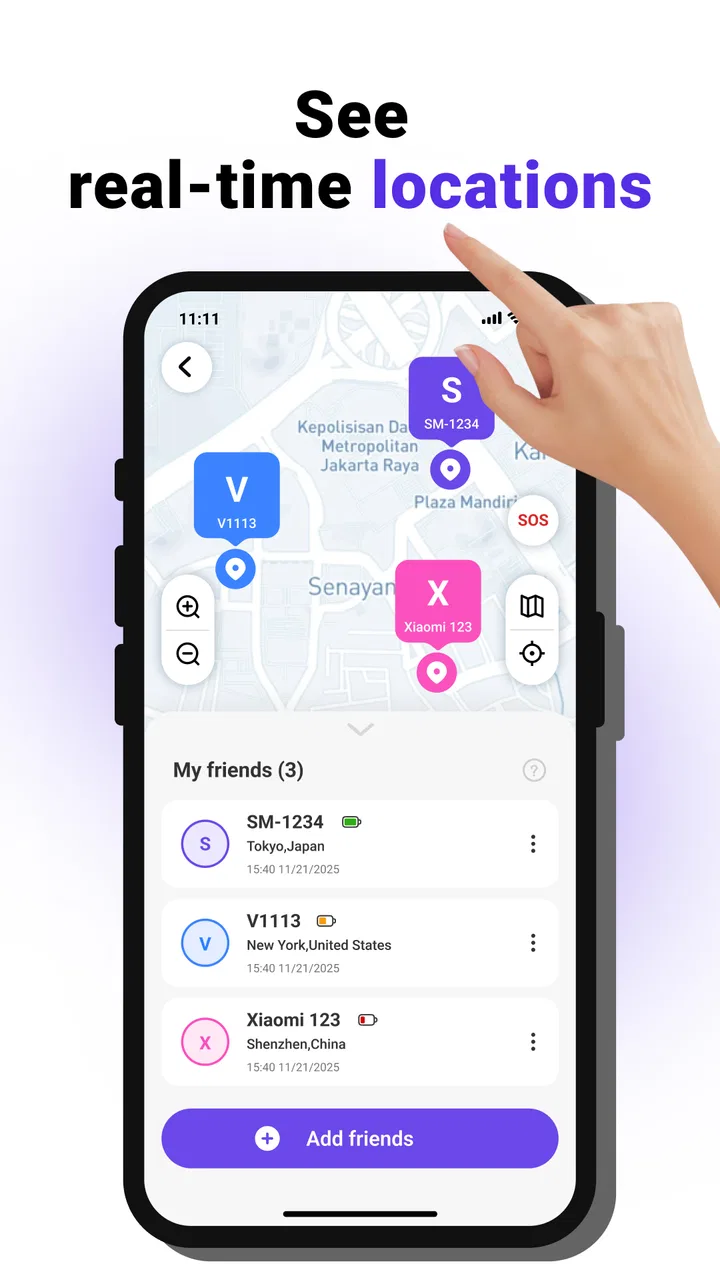
The app’s three central ideas work together: location sharing, place alerts, and SOS communication. Location sharing answers the question of where someone is. A place alert changes that into an event, such as arriving at an agreed destination. SOS is different again because it is designed for a moment when the normal routine has broken down. I like that these functions represent different levels of attention instead of forcing a family member to check a map constantly.
One useful preparation step is to define the expected outcome before setting anything up. If the goal is reassurance during a school journey, the result might be a notification that the child has reached the agreed place. If the goal is support for an older relative, the result might be knowing that a trip to an appointment has started and that help can be requested if needed. This makes it easier to tell whether the app is helping or merely generating more checking.
Setting up the people and places
In a realistic family workflow, the first person installs the app and then brings the other participants into the arrangement. The important handoff is not just technical; it is social. Everyone needs to understand whose location is being shared, who can see it, and what an alert means. I would keep the first setup small, with one trusted contact and one meaningful destination, rather than attempting to map an entire household at once.
Place alerts are most useful when they represent a real decision point. “Arrived at the clinic” is actionable. “Somewhere near town” is less helpful because it does not tell the recipient what to do next. I would choose destinations that are stable and easy for the person travelling to recognize. This also avoids a common mistake with location tools: creating so many alerts that important notifications disappear among routine updates.
A second non-obvious tip is to pair every alert with a response plan. If the app reports arrival, the recipient may simply wait. If the alert does not appear, the next step might be a phone call rather than immediate panic. If an SOS arrives, the family should already know who checks in first. The app can support that chain, but it cannot invent the family’s decision-making process.
I would also test the arrangement during a low-pressure trip. A short journey exposes misunderstandings about who is sharing, which destination is being watched, and who receives the information. Testing is especially valuable before relying on the app for a medical visit or a late-night commute. The point is not to simulate an emergency dramatically; it is to confirm that every participant understands the normal flow.
What the everyday handoff looks like
Consider a parent working from home while a teenager travels from school to a relative’s house. The teenager agrees to share their location for the journey. The parent is connected to the arrangement and watches for the place alert rather than repeatedly sending messages asking for updates. When the teenager reaches the agreed destination, the alert provides a simple handoff: the travelling person has moved from “on the way” to “arrived,” and the parent can stop monitoring.
That workflow is more respectful than asking for a live update every few minutes, but it still depends on both sides participating properly. The traveller needs to remember to begin or maintain the agreed sharing process. The recipient needs to understand that an alert is a useful signal, not proof that every detail of the journey is safe. If the person takes an unexpected route or stops somewhere else, the location may create a question that still requires a conversation.
For an older relative, the same structure can be gentler. A family member might share their location while travelling to an appointment, with a place alert marking the destination. The person receiving the alert does not need to call repeatedly during the trip. If the relative feels unsafe or needs urgent help, the SOS option provides a separate path from the ordinary location update. This distinction is important because normal tracking and emergency communication serve different emotional needs.
The handoff can also work between friends. Someone taking a long walk, travelling alone, or meeting a group in an unfamiliar area may share their location for a defined purpose. In that case, I would be careful not to turn a temporary arrangement into a permanent expectation. The practical strength of a consent-based tool is that the participants can explain the boundary before the journey begins.
How SOS changes the routine
SOS is the feature I would discuss most clearly before recommending the app. In a stressful moment, people do not want to debate what a button does or who will respond. The recipient should know that an SOS is different from an ordinary place alert and should understand what kind of help they are expected to provide. That might mean calling the person, contacting another family member, or arranging local assistance, depending on the situation.
I would not treat SOS as a replacement for emergency services. A location tracker can help a trusted contact react, but it does not remove the need to use the appropriate emergency channel when there is immediate danger. This is a crucial limitation for anyone choosing the app: the tool can be part of a safety plan, but it should not be the only part.
Another practical insight is to avoid making one person the sole recipient of every responsibility. If the family has an agreed backup contact, the handoff is less fragile when the primary person is asleep, driving, or unavailable. WeTrack may help share the signal, but the reliability of the overall workflow still depends on the people around it. I would write down the response plan in plain language and make sure the participants know it before they need it.
What I found useful, and where the flow breaks
The clearest result is reduced uncertainty during ordinary journeys. Instead of asking for constant messages, a family can use a destination alert as a checkpoint. That makes the app a good fit for people who want a lightweight layer of reassurance without turning every trip into a conversation about surveillance. The free price also lowers the barrier for families who want to try this focused approach before committing to a larger service.
It is also useful that the app combines routine and urgent situations in one place. A location share can support a normal trip, a place alert can mark progress, and an SOS can signal that the normal plan has failed. I found that progression easier to understand than a tool that treats every location update as equally important. The value comes from choosing the right level of attention for each situation.
Still, the workflow can break at several points. The first is consent. If a participant feels pressured, the technical setup may work while the family arrangement fails. The second is attention: a recipient who ignores notifications will not benefit from them. The third is interpretation. A missing arrival alert may reflect a changed plan or a technical interruption, so it should begin a check-in process rather than automatically proving danger.
Battery and connectivity are practical concerns for any location-based app, and I would plan around them rather than assume perfect continuity. A phone that is switched off, has no usable connection, or is left behind cannot provide a dependable live picture. This is why I prefer using WeTrack as one layer in a broader plan that includes a phone call, a known itinerary, and a trusted person who understands the circumstances.
Privacy is another reason to keep the arrangement narrow. I would not share locations with a large group simply because the option exists. One or two trusted contacts are easier to manage, and they reduce the chance that sensitive movement information becomes casual household gossip. The app’s consent-based positioning is a good foundation, but responsible use still depends on choosing the smallest audience that can genuinely help.
Compared with ordinary messaging, WeTrack offers a more structured workflow. A message such as “I arrived” depends on the traveller remembering to send it, while a place alert is intended to mark the destination automatically within the app’s location-based process. Messaging remains better for explanations, changes of plan, and personal conversation, so I would use both rather than replacing one with the other.
Compared with a full family-location platform, WeTrack appears more focused. Someone looking for extensive history, elaborate household controls, or a broad collection of lifestyle tools may prefer a more established alternative. On the other hand, that narrower approach can be an advantage for a family that only needs shared location, arrival awareness, and an SOS route without turning the app into a permanent dashboard.
I would skip it if the people involved are not comfortable with location sharing, if the intended use requires professional emergency monitoring, or if everyone already has a trusted system that handles these check-ins better. I would also avoid depending on it as the only safety measure for someone travelling in genuinely high-risk conditions. Its role is supportive and practical, not a substitute for judgment, communication, or emergency services.
For a free Android tools app, WeTrack makes the most sense when the desired outcome is clear: one person shares willingly, another receives meaningful place information, and everyone knows what an SOS should trigger. The developer is Khan eCoding, and the app is suitable for Everyone, which makes it approachable for a household trial. My recommendation is to begin with one journey, one destination, and one trusted contact, then review whether the alerts actually reduce stress.
My final view is positive but measured. I would recommend WeTrack - Location Tracker to families that want a simple, consent-based safety routine and are willing to agree on boundaries before using it. I would not recommend treating it as invisible surveillance or as a complete emergency system. Used thoughtfully, it turns a vague “let me know when you get there” into a clearer handoff from traveller to trusted contact, and that is where its practical value is strongest.
FAQs for WeTrack - Location Tracker
01What is WeTrack - Location Tracker used for?
WeTrack - Location Tracker is designed to help users keep tabs on the real-time location of family members, friends, or employees. It's ideal for ensuring safety, coordinating meet-ups, or managing a team. The app offers features like geofencing, location history, and customizable alerts to enhance user convenience.
02Is WeTrack - Location Tracker secure and private?
Yes, WeTrack prioritizes user privacy and security. All location data is encrypted and shared only with authorized users. The app complies with data protection regulations, ensuring that your information is safe from unauthorized access or misuse. Users can control who sees their location and customize privacy settings.
03Can I use WeTrack on both Android and iOS devices?
Absolutely. WeTrack - Location Tracker is available for both Android and iOS platforms, ensuring cross-device compatibility. This means you can track and share locations between different types of smartphones, making it versatile for families or teams using varied devices.
04Does WeTrack require an internet connection to function?
Yes, WeTrack needs an active internet connection to update and share location data in real time. Without internet access, the app may not provide accurate or timely location updates. However, once reconnected, it will sync and update any changes that occurred while offline.
05Are there any subscription fees for using WeTrack?
WeTrack offers both free and premium subscription options. The free version includes basic location tracking features, while the premium subscription provides enhanced functionalities like advanced geofencing, detailed location history, and priority support. Subscriptions can be managed and canceled at any time through your app store.
Pros
- Real-time location updates.
- User-friendly interface.
- Low battery consumption.
- Customizable alerts.
- Cross-platform compatibility.
Cons
- Requires constant internet connection.
- Limited features in free version.
- May raise privacy concerns.
- Occasional GPS inaccuracies.
- Ads in free version.

WeTrack - Location Tracker
Gallery